Analogica Lab Super 16 Kodak 200T – Resolve PowerGrade and LUT
Analogica Lab Super 16 Kodak 200T – Resolve PowerGrade and LUT
Instant digital download
- Format.cube LUT files
- Works withDaVinci Resolve, Premiere Pro, Final Cut Pro, CapCut and most editors that load LUTs
- DeliveryDownload link right after checkout, also sent by email
Couldn't load pickup availability
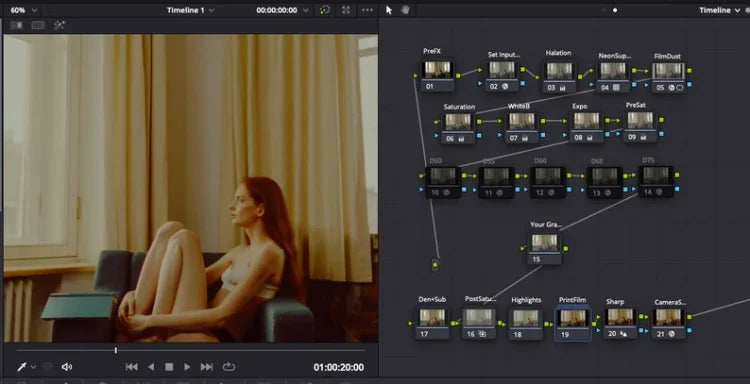
This PowerGrade pulls digital footage toward the warm, slightly hazy look of Super 16mm Kodak 200T: tungsten-balanced warmth, buttery highlight roll-off and a soft, low-contrast base. Halation glows around bright edges, fine grain sits over the frame, and skin lands warm with a gentle vintage undertone rather than an orange cast.
It is built as a full node tree in DaVinci Resolve Studio, so nothing is baked in and every layer can be adjusted. A .cube LUT version is included for a faster one-click grade in other editors.
- Separate halation, grain, bloom and diffusion layers
- Exposure, contrast and colour temperature control nodes
- One-click .cube LUT for DaVinci Resolve, Premiere Pro, Final Cut Pro and other LUT apps
- PowerGrade requires DaVinci Resolve Studio
- Great for narrative and indie films, music videos, fashion films and documentaries
How to install
DaVinci Resolve: Project Settings → Color Management → Open LUT Folder, copy the .cube files in, then click Update Lists.
Premiere Pro: Lumetri Color → Creative → Look → Browse, and pick a .cube file.
Final Cut Pro: add the Custom LUT effect to your clip and choose the .cube file.
Set exposure and white balance first, then apply the LUT and adjust its intensity to taste.
Delivery
This is a digital product and nothing is shipped. After payment you get a download link on the order confirmation page, and the same link is emailed to you.
Need help?
If something does not work as expected, contact us with your order number and we will help you out.